Newsletter: January 2026
Areté is kicking off 2026 with application improvements, including enhanced interfaces, new capabilities, and fixes. We're committed to introducing updates this year that make our applications easier to use than ever.
This month, we're introducing the ability to edit forecasted revenues in Prevail11 editors, allowing you to easily edit both quantities to dollar amounts.
New Prevail11 calculators now allow interfaces to merge negative volumes as zero, improving integration capabilities.
In Avail11, planners can mix Display and Buy sourcing individually, providing finer control over adjustments and configuration in these modules.
In both applications, Meta Reports can now be exported to Excel or CSV files, streamlining your report export workflow. These export jobs can be scheduled through job chains to run at specific times, automating previously manual tasks.
We've also updated the launcher forms for some Export processes, allowing planners to enter their reports and automatic processor jobs. Clients with specific needs can now customize launcher forms to match their interface settings.
Edit and Manage Revenues in Prevail Editors
Prevail11 Forecast editors now include Editable Forecasted Revenue fields for Net and Retail Revenue. Planners can input pricing and volume totals and Prevail will automatically adjust Revenue using the following formula: Price × Volume = Updated Revenue
Planners are no longer limited to editing case quantities. They can now edit dollar revenue amounts as well. This new capability is available in the Edit Outline Vista, Excel Outline Export, and Edit Summary Vista editors.
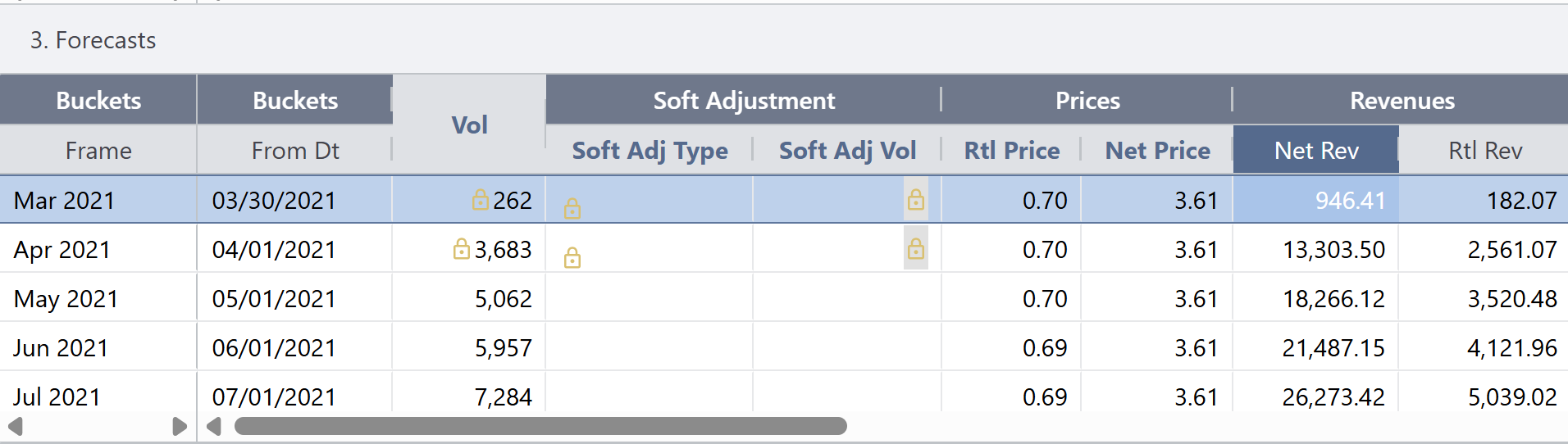
Prevail11 Forecast editor with Editable Revenue fields
Smoother Integration for Managing Negative Sales Volumes in Prevail11
Previously, negative sales volumes found in History Parcels were not prevented from merging into Prevail11 sales history and statistical models.
This issue has been corrected: negative volumes now merge as zero, and an alert is generated in the merge validation file indicating the existence of negative sales in the source data.
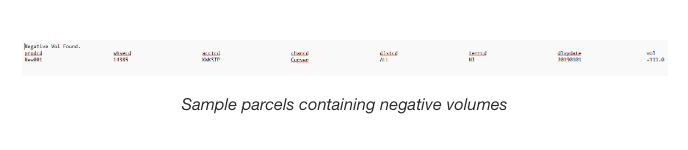
Sample parcels containing negative volumes
Improved Meta Report Exports
Meta Reports can now be automatically exported to Excel or CSV files; these exports now can be created through scheduled job chains.
To configure exports, navigate to Analysis > Export Meta Reports to Excel on the menu.
- Report: Pick the meta-report to be exported
- File Name: Name the file with extension .txt, .csv or .xlsx to indicate the file type
- Export Folder: Where the file will be dropped (based on access from the environment where typically this is to the outbox to be processed further)
- Prepend User Name: Select this to put username at beginning of file name
- Append Timestamp: Select this to a timestamp of the export time at the end of file name
- Delimiter for Text Files: Indicate the type of delimiter for text files such as |
- Number of Decimals: Indicate number of decimals for precision
- Show Total: Select this to show subtotals and Totals rather than a flat file
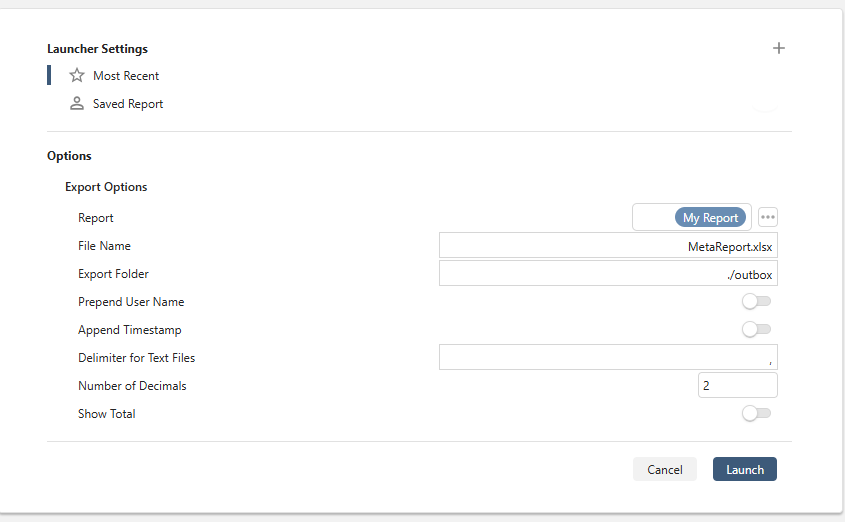
Export Meta Reports launcher form
Can Update Avail11 Deploy and Buy Sourcing Through Item-level Detail Edits
Previously, Avail11's Edit Product and Material sourcing feature only allowed high-level edits in the sourcing matrix. With this update, Planners can now edit or delete Deploy and Buy sourcing individually at the item level.
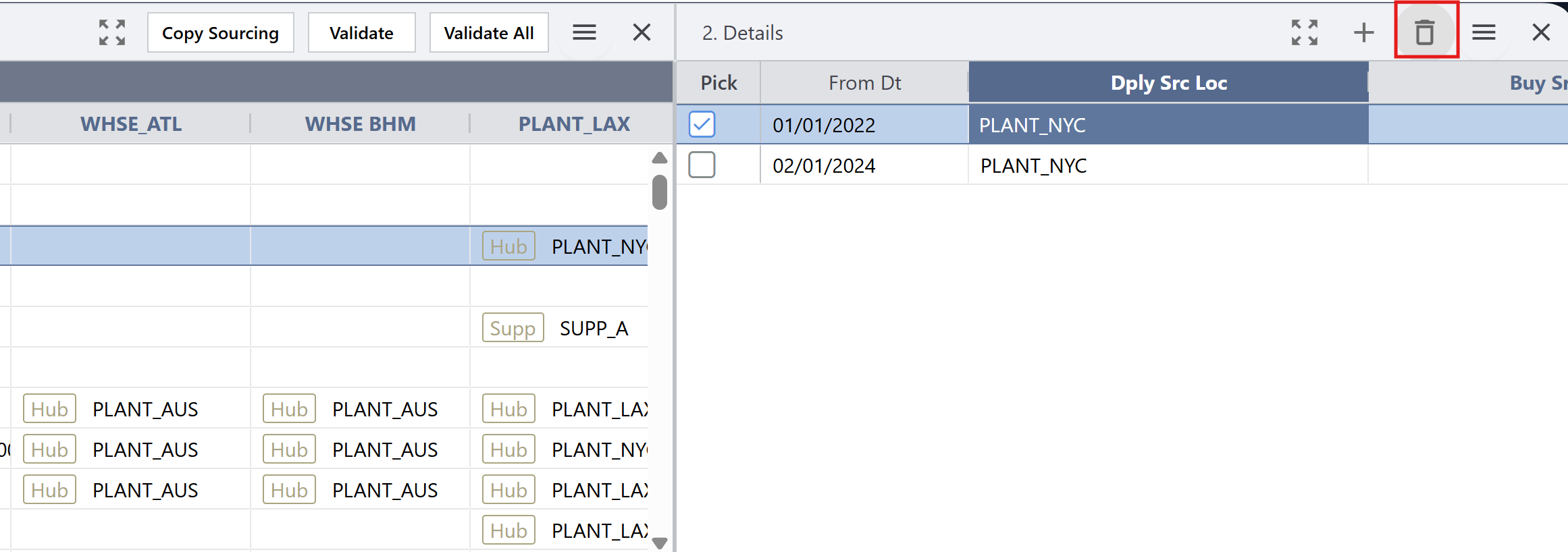
Ability to delete individual sourcing in the Details pane
Interface-Specific VIP Export Customization in Avail11
For clients exporting Scheduled Shippers to VIP, we've added options to customize and specify these exports.
Planners can now select preferred launcher form settings.
The launcher form now allows planners to select an item Unit of Measure (UoM).
We've also renamed the Retailer Code field to To Loc Cd and the Warehouse Code field to Fr Loc Cd for increased clarity in the Export.
When exporting to VIP, Avail11 now automatically inserts log records into the following queryable tables:
- DplyShipLogs
- PurchShipLogs
- BuyShipLogs

Example VIP Export log entry
Contact us to learn more about all updates and enhancements in the latest version.
New Blog Posts to enhance your Supply Chain Planning

Foundational Inventory Metrics: Building your Measurement Framework
Effective inventory management requires comprehensive measurement across multiple business dimensions. This five-part blog series provides supply chain professionals with actionable insights to key metrics that drive performance, from foundational measurements to advanced financial analysis.

Sustainable Practices: Environmental and Utility Measures for a Greener Future
Discover how key environmental and utility measures can help CPG industries operate more sustainably. These measures can also help companies meet long-term operational efficiency metrics and cost-saving targets.
Want to review our other Blog Posts? Click on the button below to access all our previous blogs or newsletters!
Please contact us if you have any questions or suggestions!
Areté values honest customer feedback. Please take this three-question, anonymous Survey to let us know how we are doing.