Newsletter: May 2025
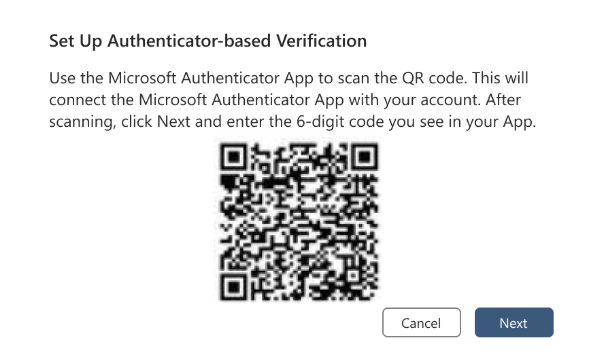
Areté has now integrated an upgraded security system using the Microsoft Authenticator app. This new layer of security ensures that only the authorized user has access to the application through a two step Multi-Factor Authentication method backed by Microsoft's trusted technology.
Our latest release also introduces a second addition to our widget gallery: Deploy Request Widgets. These new widgets show the gap between the scheduled and required shippers for each warehouse and help to visualize Fulfilled, Unfulfilled and Overfulfilled shippers in an interactive way.
Dual Defense with Microsoft Authenticator and Email MFA
This month we have introduced two new security enhancements: Microsoft Authenticator and Email Multi-Factor Authentication. After an appropriate authentication method is configured in the Users Table, Authorized Planners must scan a QR code to connect to the Microsoft Authenticator app and will then receive a unique six-digit code on their app that will grant them secure access to Avail11 and Prevail11. There is also an alternative authentication option to receive the code via email.
These new security features allow for an improved user experience that is secure and protected. Look for new updates as we continue adding functionality to our security suite.
Visualize Gaps between Scheduled and Required Deployment Quantity
The Avail11 Deployment Module generates Deployment Requirements that aim to fulfill demand and share inventory across the network to avoid stockouts. However, it may happen that Planners will need to change the actual deployment amount to account for any production delays, changes in inventory, truck constraints or last-minute decisions to ship excess inventory from the Hub to the Warehouses. Avail11 will compare the generated Deployment Requirements to the actual Deployment Schedules and identify any gaps. This actual vs required data can now be visualized easily with the help of the new Deploy Request Widgets.
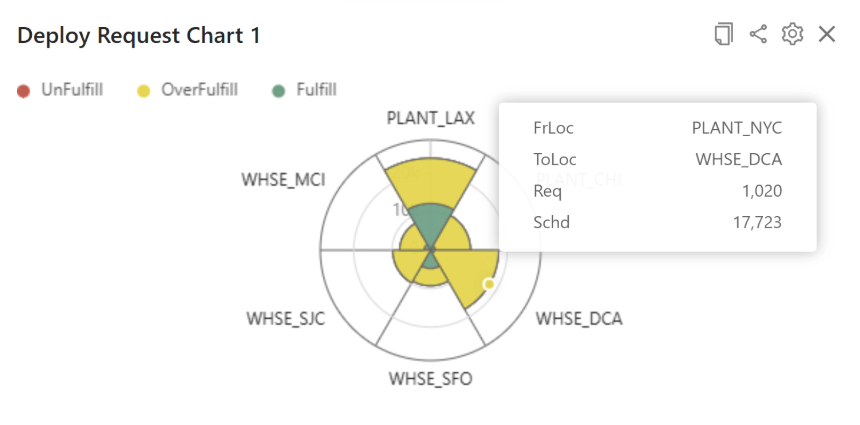
The new Deploy Request Chart will show a color-coded graph of Unfulfilled and Overfulfilled requirements by Warehouse. Hovering on a particular Location zone will display the From and To Location and associated Required and Scheduled Quantities.
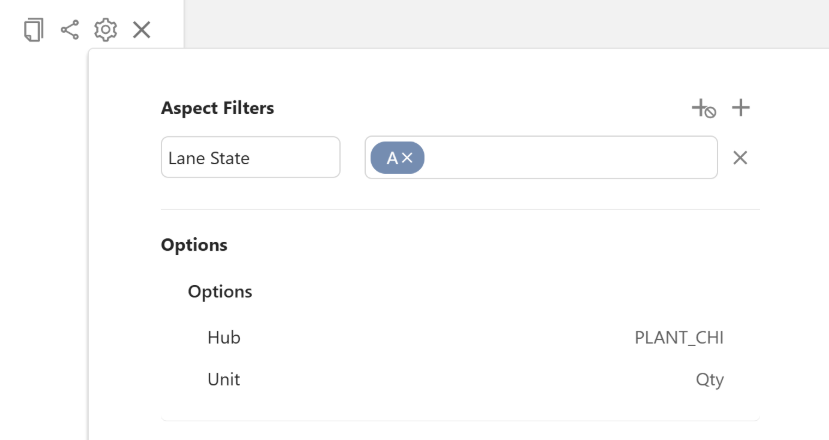
A Planner can drill down to filter on a specific Hub or Unit in the chart, adding aspect filters as needed.
Contact us to learn more about all updates and enhancements in the latest version.
Check out our Blog to explore Supply Chain Strategies for Success!

Building a Quality Index for Beverages: A Comprehensive Guide
Explore our comprehensive guide for developing a Quality Index for different beverage types using established guides. We also dive into actionable insights and alert mechanisms for individual component failures in depth.

Optimizing Sales and Delivery Performance with Key Metrics
The second installment of our distribution series focuses on sales performance, fleet capacity, and customer satisfaction. We discuss key metrics for efficient distribution operations.
Check out additional Blog Posts for Supply Chain Excellence Strategies →
About the Author

Shruti Natal
Business Development and Supply Chain Optimization Analyst
Shruti is a part of the implementation team (Prevail and Avail). She collaborates with clients to ensure a smooth working experience with Areté Inc.