Newsletter: February 2026
Areté recently delivered a major refactor of the Tactical Replenishment Planning (TRP) module, deeper integration between Avail11 TRP, Make, and Deploy modules, and improved multi-run editing in the Production module.
Prebuild Inventory Policy
The TRP module in Avail11 has undergone significant upgrades to support more granular planning, flexible constraint management, and tighter integration with downstream modules. The key enhancements are outlined below.
1) Checkout Enhancements
Avail11 TRP previously operated exclusively on monthly buckets, the standard long-term aggregation for tactical planning. To capture product requirements at the weekly level, TRP now supports telescoping buckets configured during the checkout process.
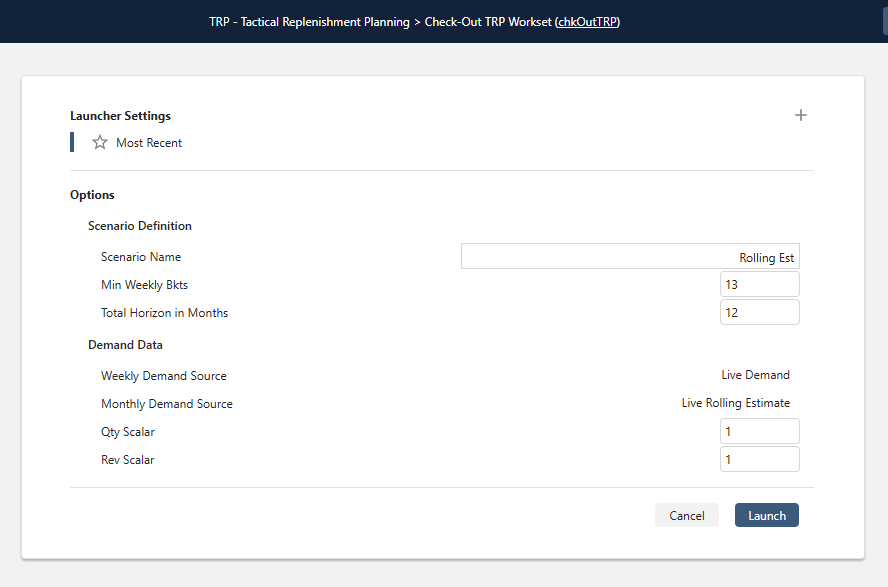
TRP Check-Out launcher form with Scenario Definition and Demand Data settings
Planners can select the minimum number of weekly buckets required. The system then fills the remainder of the month with week and part-week buckets, followed by full monthly buckets for the rest of the checkout horizon. Demand for weekly and monthly horizons can also be sourced from separate data tables.
2) Hard Constraints: Capacity-Driven
Production Line Hour Capacity was previously the only hard constraint in TRP. Two additional capacity-driven hard constraints have been introduced:
- Warehouse Capacity: Prevents the solution from exceeding available storage capacity (typically measured in inventory pallet positions) at a plant or warehouse.
- Truck Capacity: Prevents the solution from exceeding the maximum number of trucks per day on each lane.
All the hard constraints can be independently enabled or disabled when generating a solution.
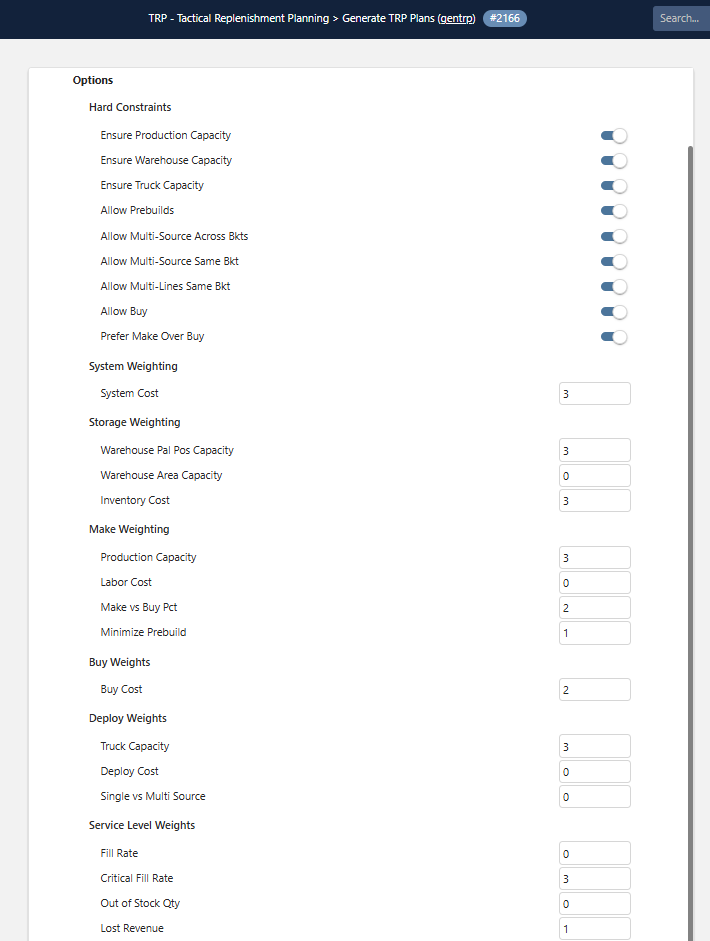
Generate TRP launcher form
3) Hard Constraints: Origin Controls
Additional hard constraints control which origin candidates are allowable for a warehouse:
- Allow Prebuilds: Determines whether requirements can be built ahead of the due date.
- Allow Multi-Source Across Buckets: Allows a requirement to be split across different origins in different buckets (e.g., one plant producing part of a requirement one week, another plant the next).
- Allow Multi-Source Same Bucket: Allows a requirement to be split across different origins within the same bucket.
- Allow Multi-Lines Same Bucket: Allows a requirement to be filled by multiple production lines within the same bucket.
- Allow Buy: Enables suppliers to be used as origins.
- Prefer Make Over Buy: Prioritize supplier use in situations where production capacity is exceeded.
4) Soft Constraints: Configurable Weighting
Planners can now define the relative importance of soft constraints to guide the solution. Each constraint includes its label, slider or value, plus brief description, and up to 5x multi-sourcing preferences. Each soft constraint is assigned a weight that influences the algorithm's prioritization.
5) Simplified Algorithm: Genetic Algorithm
The previous suite of TRP algorithms has been consolidated into a single Genetic Algorithm, well-suited for multi-constraint optimization problems. A unified function aggregates all soft constraints and their associated weights into a single score, enabling TRP to efficiently optimize complex trade-offs.
6) Integration with Make and Deploy Modules
When a TRP scenario is produced in Product Replenishment, the new module automatically processes production data and provides it to the Make (Production Scheduling) module. The Make module then shows TRP Prebuild requirements, and it integrates and incorporates them into the scheduling alongside regular demand.
Prebuild runs are visually distinguished in the interface in three ways:
- Production Timeline: Prebuild runs display a left-pointing chevron (>) symbol.
- Production Calendar: A small chevron appears in the bottom-right corner of each Prebuild run.
- Runs Grid: Shows the Prebuild Requirement quantity and the "Prebuild Req From Date", i.e. the date the requirement is actually due. For example, a requirement due on May 3 may be produced on April 7.
The Deploy module is also integrated with prebuild tables and parameters including days of supply, inventory zones, and logistics rules.
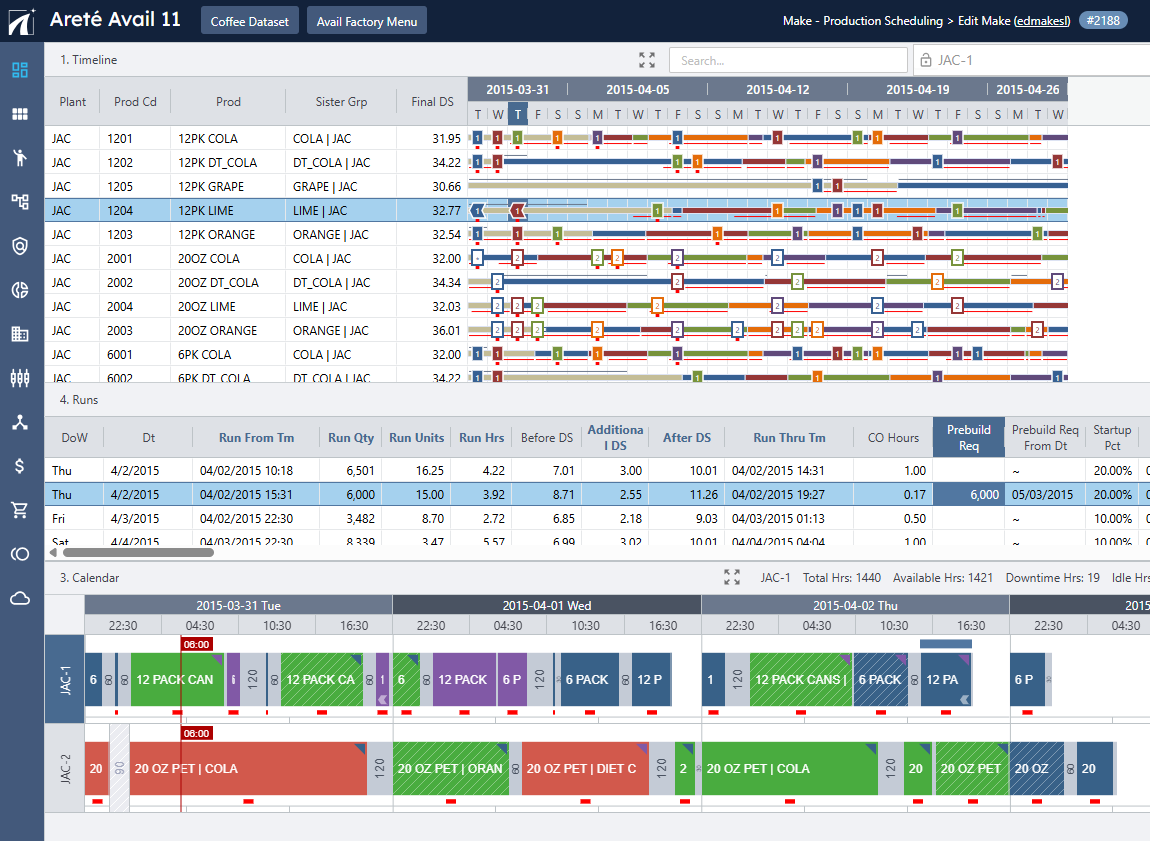
Sample Production Calendar containing TRP Prebuild Requirements
Avail11: Drag and Drop Multiple Runs
Planners can now select and move multiple production runs simultaneously in the Avail11 Production Schedule. Previously, only a single run could be selected at a time. Now, Planners hold the Ctrl key while clicking each run, then drag them to the desired time or time periods.
This update significantly reduces the time required to fine-tune and reorder production schedules, especially when moving linked products across multiple items or time periods.
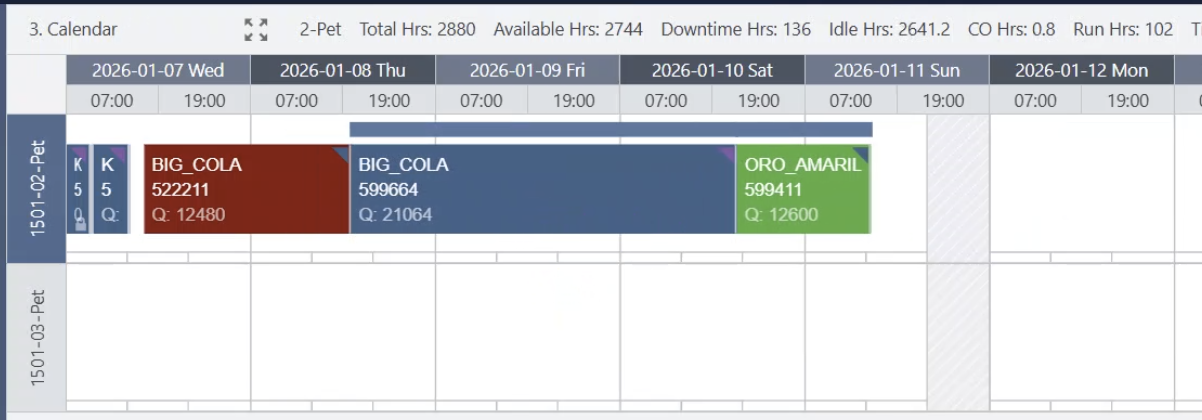
Sample Production runs selected
Contact us to learn more about all updates and enhancements in the latest version.
New Blog Posts to enhance your Supply Chain Planning

Sustainable Practices: Environmental and Utility Measures for a Greener Future
Discover how key environmental and utility measures can help CPG industries operate more sustainably. These measures can also help companies meet long-term operational efficiency metrics and cost-saving targets.

Foundational Inventory Metrics: Building your Measurement Framework
Effective inventory management requires comprehensive measurement across multiple business dimensions. This five-part blog series provides supply chain professionals with actionable insights to key metrics that drive performance, from foundational measurements to advanced financial analysis.
Want to review our other Blog Posts? Click on the button below to access all our previous blogs or newsletters!
Please contact us if you have any questions or suggestions!
Areté values honest customer feedback. Please take this three-question, anonymous Survey to let us know how we are doing.