Newsletter: November 2025
Areté has introduced a new Prevail11 module designed for Sales Routes Management (SR) in the new November release. Sales Routes Management is the process of planning, organizing, optimizing and monitoring the sequence of sales activities assigned to a specific route or collection of outlets. Regardless of whether your company has a field sales team or sales representatives, the new SR module will ensure that you have consistent and efficient visibility to plan customer demand for sales channels.
The new Sales Route Management (SR) module functions similarly to other Prevail11 modules, following a standard three-step process:
- Upload Master Data
- Generate Forecasts
- Refine and Fine-tune Forecasts
The Prevail11 SR module enables definition of custom, structured routes which may be based on customizable SR Tags, such as for Location, Distance, or Customer Count. This new functionality enables controlled and optimized planning for Sales Volumes and Revenues across different channels.
We'll now explore the set up and use of the new SR module in Prevail11.
Sales Routes Master Data
As for other Prevail11 modules, the first step of the weekly SR process is to configure or upload Master Data which enables Prevail's sophisticated forecasting engine to generate accurate forecasts. The required data can be loaded through two new P11 data parcels: SROUTES and SRHISTS. Your company's data management team can help us to configure automated data merging for existing sales route historical volumes and revenues; the automated process will then be used to upload fresh data at any desired frequency to ensure that Prevail always displays correct and up-to-date SR values.
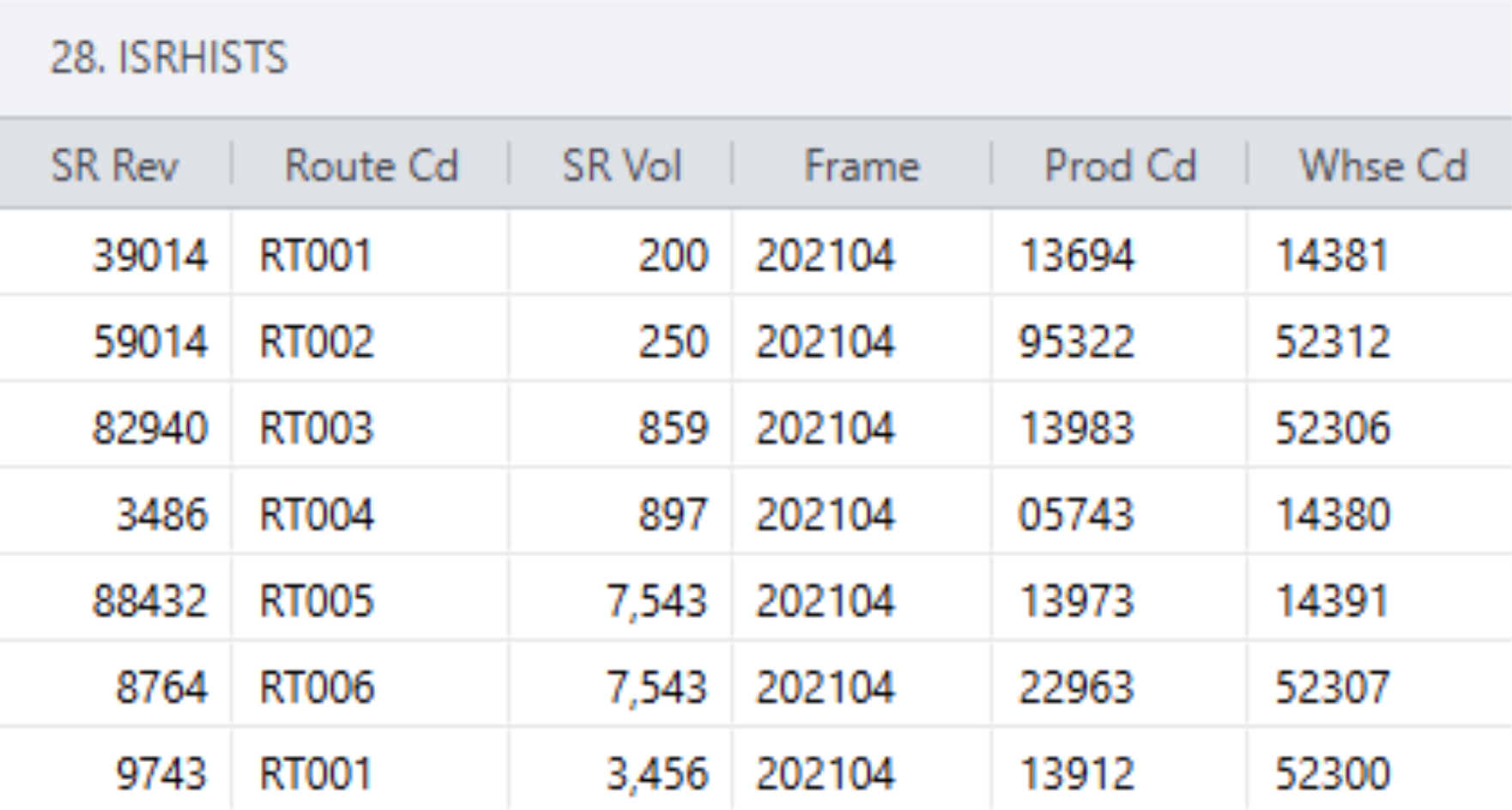
Sample Sales Routes Data in the SRHISTS Parcel
Data Validation and Configuration: Sales Routes Editor
Merged Master and Historical SR Data can be viewed in the Sales Routes editor to review its completeness and accuracy, and to refine any aspects required. Planners can add aspect filters in this editor to display only necessary and relevant information here.
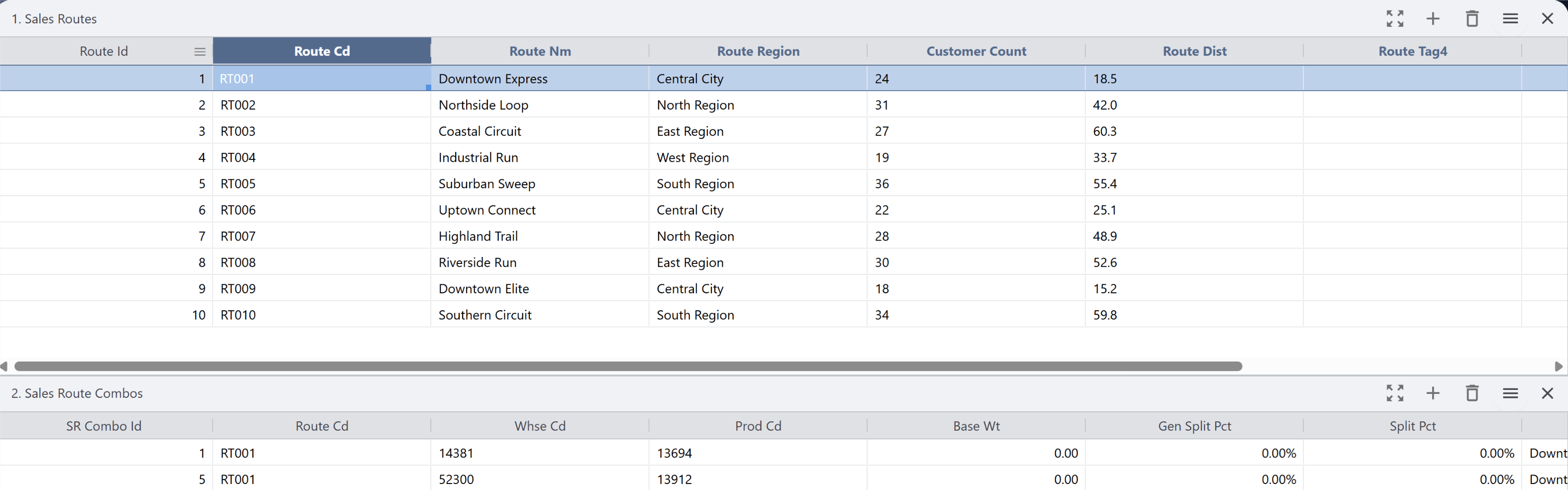
Sample Sales Routes Data in the Editor
The Sales Routes editor consists of two named panes: Sales Routes and Sales Routes Combos. The Sales Routes pane displays records for all Sales Routes while the Sales Routes Combos pane displays all associated combos for the single Sales Route record selected.
Combos and Routes can also be added or deleted in Prevail11 using this editor.
Generating Sales Routes Forecasts
The SR Forecasts Generation process is standard to Prevail11 and starts with generating Sales Routes Statistics, a backend process that calculates combo state, historical and future frames, combo split percents, ensuring that the forecasting engine has all required data. This Generate Statistics process is typically automated through P11 chain jobs functionality so that the Planner does not need to execute it manually.
The next process step is to generate Sales Routes Forecasts through the Generate SR Forecasts option. The option launcher form (shown below) enables Planners to configure the forecast generation duration and calculates daily forecasts on a month-to-month basis. This generation process step can also be automated through chain jobs.
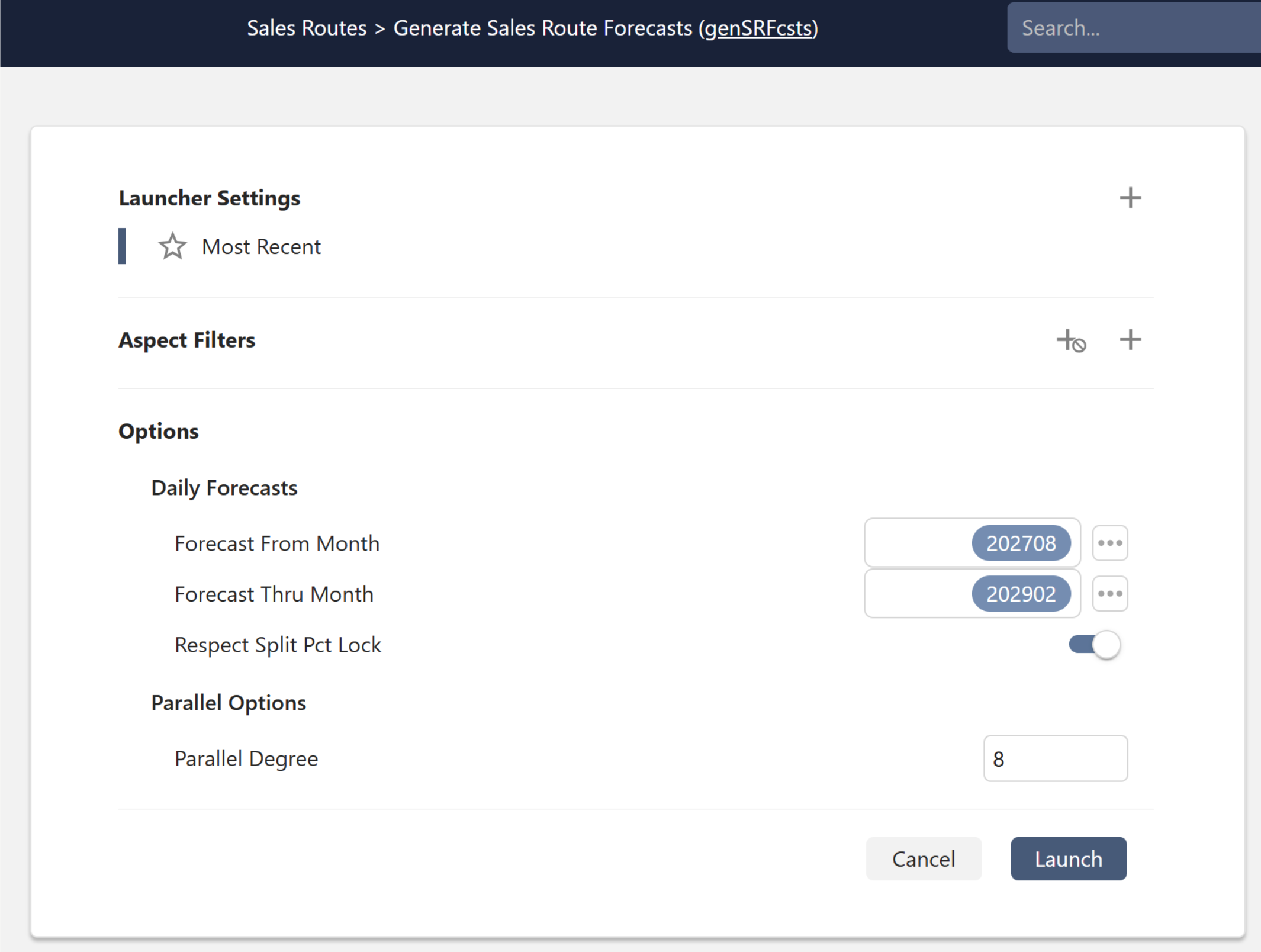
Launcher Form for Generate Sales Route Forecasts
Managing Sales Routes Forecasts in Prevail11
Generated SR forecasts can be viewed and edited in the Prevail11 Query/Edit SR Outline Vista editor. The option launcher form is similar to the standard Edit Outline Vista launcher, including options to enter Aspect Groups, Aspect Filters, Horizon Mode and Pivot Field. This SR Outline Vista lets Planners analyze and edit the Vista and Combo SR forecasts, featuring a Vista Chart that displays SR forecast/history graphs as found in the standard Edit Outline Vista.
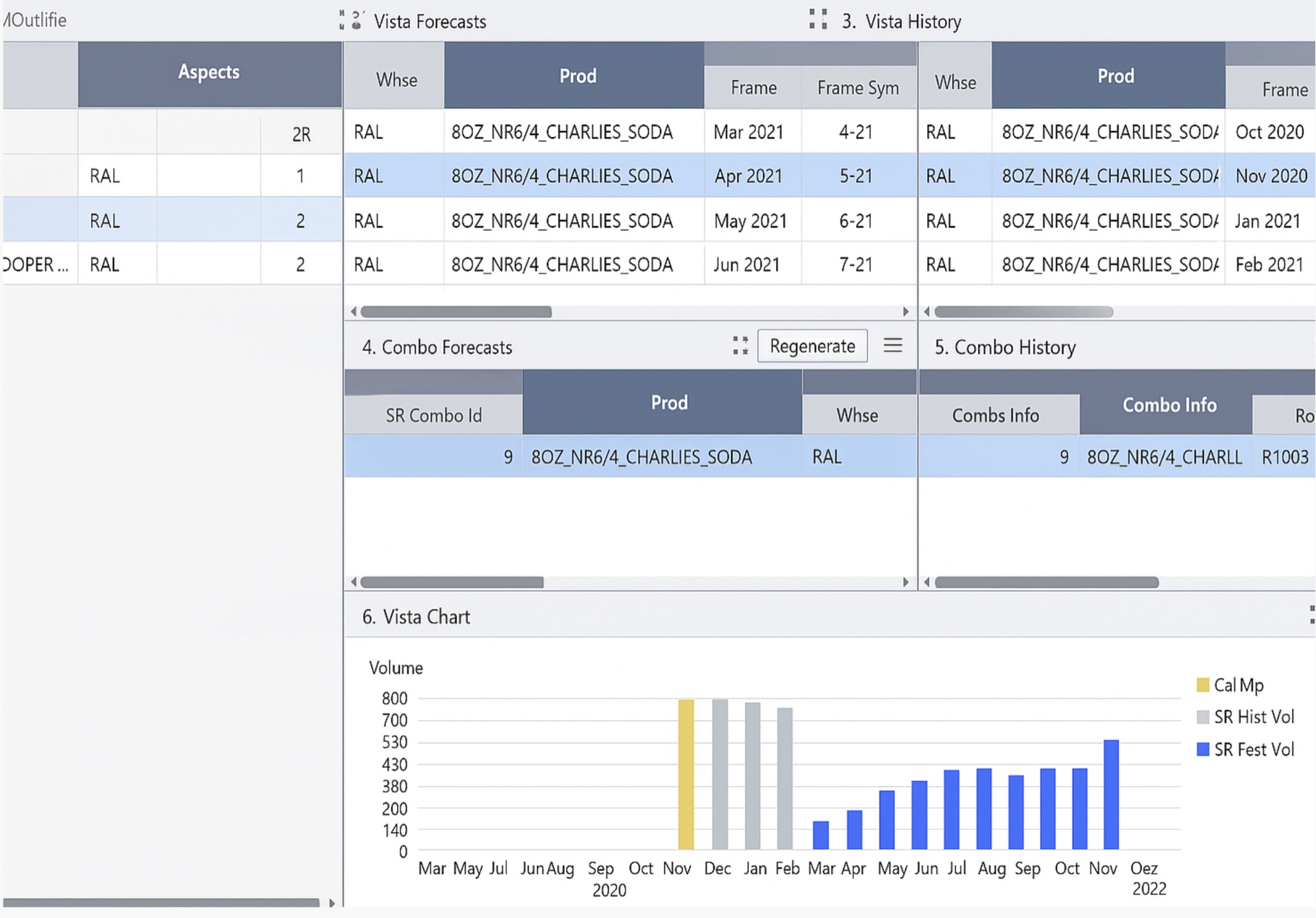
Sample SR Outline Vista
Export Sales Routes Outline
The Export SR Outline option allows Planners to export the Outline Excel, enabling external SR Forecasts edits. When Rolling Window is selected as the Horizon, the History and Forecast will be in Frames whereas for Calendar Horizon, the History and Forecast will be in Months. The Exported Field Options available are SR Volumes and SR Revenue. Planners can also create a csv output file with the Outline to process in Excel or send to other platforms.
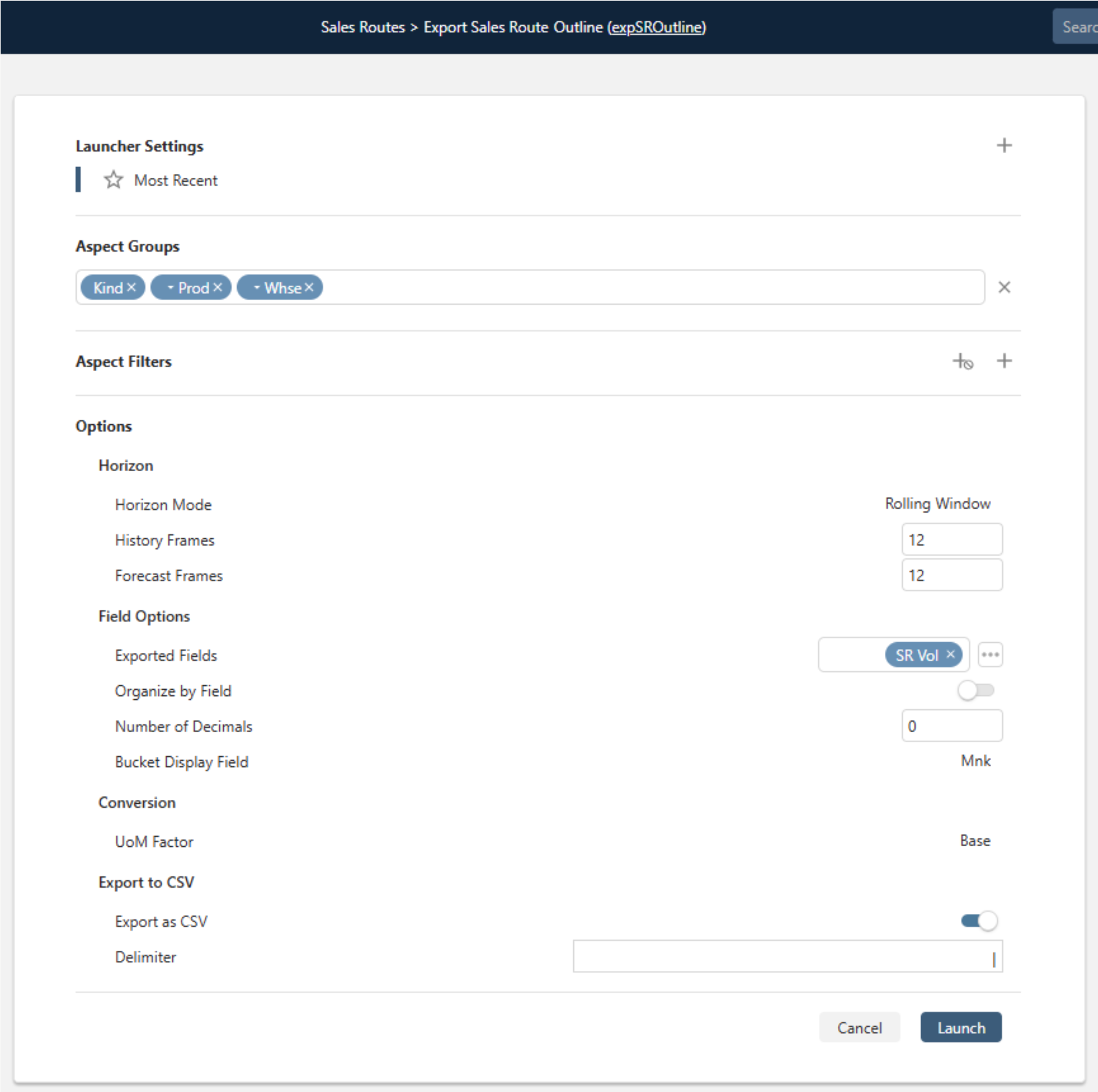
Sample Export Sales Routes Outline Launch Form
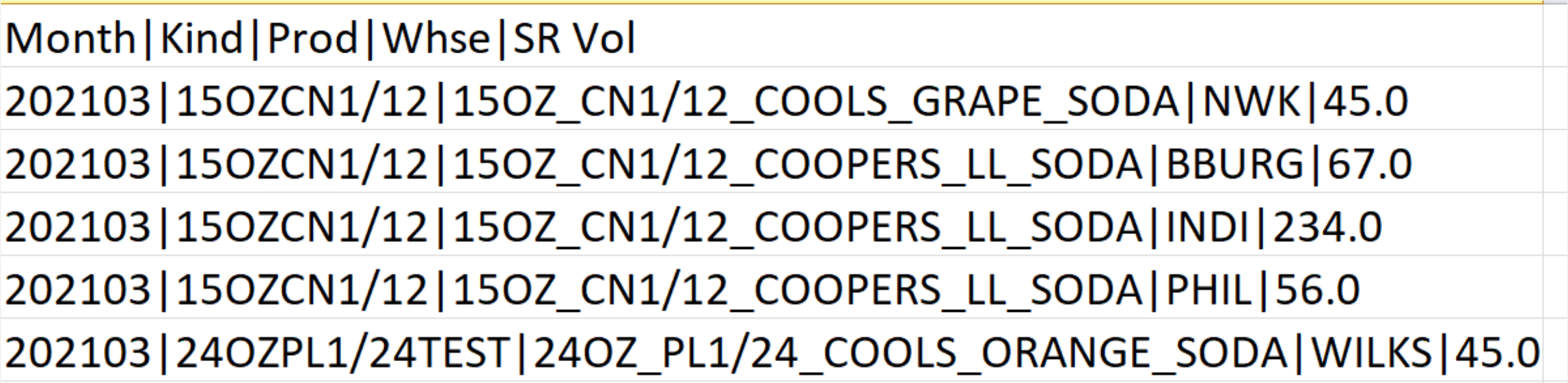
Sample Sales Routes csv File
Our new Sales Routes Module delivers end-to-end support and enhanced visibility for planners, enabling optimal sales channel planning. Powered by the same robust forecasting engine and AI-driven models, the module provides high-quality volume forecasts for each route. Prevail11 now allows planners to make more informed, precise, and controlled decisions across their sales networks.
Contact us to learn more about all updates and enhancements in the latest version.
New Blog Posts to enhance your Supply Chain Planning

Taming Variable Relationships in Modern Demand Planning Models
Modern Demand Planning Models go beyond the traditional statistical models and involve neural networks, gradient boosting and other complex calculation methods. Read this blog to understand how to make effective use of demand planning variables to increase the accuracy of your forecasts.

Is your Business Ready for the Holiday Season?
The upcoming 2025 holiday season will likely foster a significant surge in demand coupled with supply chain challenges such as delayed shipments, and labor constraints. Our latest blog will give you specific insights into 2025 Holiday season predictions, challenges and potential solutions to help you address them.
Want to review our other Blog Posts? Click on the button below to access all our previous blogs or newsletters!
Please contact us if you have any questions or suggestions!
Areté values honest customer feedback. Please take this three-question, anonymous Survey to let us know how we are doing.